
Lüksgazino Registration: Opening Your First Session
A new user opens the registration page and finds a short form. It fills out in a couple of minutes and offers two tabs: phone or email. This page walks through that first session in the order a user sees it.
Step One: Pick a Tab
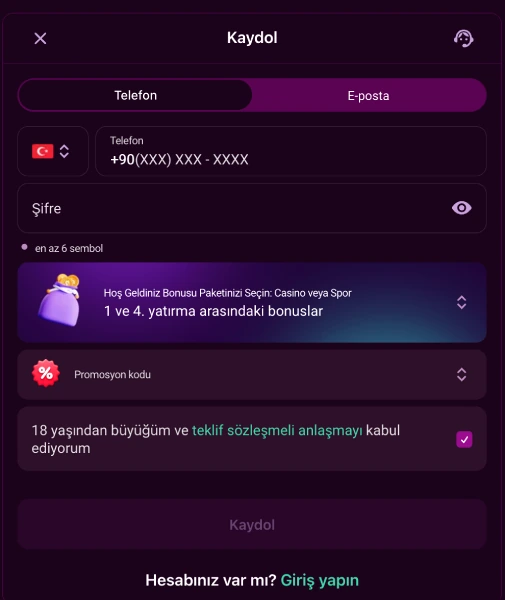
A user first decides between the phone tab and the email tab. On the phone tab, the country code arrives pre-filled at +90, followed by a number in +90(XXX) XXX-XXXX format. On the email tab, a valid address is the only requirement. This early choice also sets the method used on future logins.
Step Two: Finish the Remaining Fields
After the tab is picked, four more fields remain, and they stay identical either way. A password needs at least 6 characters, with a show/hide toggle nearby. A welcome package gets selected: Casino Package, Sports Package, or no bonus at all. A promo code goes in an optional field if one exists. Last comes a consent checkbox confirming the user is over 18 and accepts the terms. Leaving any of these four blank keeps the "Register" button inactive.
Step Three: Submit and Enter Identity Checks
Once submitted, the form asks for a first and last name, ideally in Latin letters. The operator may check age and country of residence at this stage. No document upload happens during registration itself; that step only appears before a withdrawal. An independent provider called KYCAID runs it and accepts three document types: ID card, passport or driving licence. A user can upload from a computer or finish the process on a phone. Choosing a type and pressing "Submit" completes the step. Without document approval, no withdrawal request goes through, and the review time is not published.
Step Four: Clear the Withdrawal Checklist
Three items sit between registration and a first withdrawal: phone confirmation, email confirmation and a first real-money deposit. None of these three can be skipped before a request is processed.
What Changes After Registration
Only phone or email gets entered during signup, but that changes once the account exists. Later logins gain a third option: an account ID the system assigns automatically. That number, paired with the password, works on the login page alongside the original two methods.
Registering From a Mobile Device
The same form opens from a mobile browser with identical fields and tab layout. On Android, the app installs via QR code as an APK file, which requires allowing an unknown source. iOS carries no official store app; "Add to Home Screen" inside Safari fills that role instead. Registration steps stay the same on either path. Setup details live on the mobile app page.
One Person, One Account
Under the rules, a single person may hold only one account, even across different phone or email details. Transfers between accounts are blocked entirely. A withdrawal always returns through the same method used for the deposit. IP address and browser details are logged automatically by the system.
Unlocking the Trial Bonus
Finishing phone and email confirmation opens one benefit for a new user: the 500 TRY trial bonus, which carries no deposit requirement of its own. Confirmation alone unlocks it. A first real deposit can then follow through any method on the deposit page.
Age Declaration and Account Closure
The registration checkbox is a mandatory declaration that the user is over 18. Anyone wanting to pause an account can send a request once every 90 days from their registered email. The account closes once any outstanding payments settle, and a new request needs at least 30 days to follow. General registration details also sit on the homepage.
Frequently Asked Questions
Should I register with phone or email?
Both work. The tab you choose on your first session is the one you use for later logins too.
Which documents are needed for identity verification?
Document verification runs through KYCAID. You can upload an ID card, a passport or a driving licence.
Can the same person open more than one account?
No. Under the terms and conditions, each user may open only one account.
Can I withdraw right after registering?
No. Phone confirmation, email confirmation and a first real-money deposit must be completed first.
Do I need to deposit for the trial bonus?
No. The 500 TRY trial bonus does not require a deposit. The requirement is phone and email confirmation.
Frequently Asked Questions
Should I register with phone or email?
Both work. The tab you choose on your first session is the one you use for later logins too.
Which documents are needed for identity verification?
Document verification runs through KYCAID; you can upload an ID card, a passport or a driving licence.
Can the same person open more than one account?
No. Under the terms and conditions, each user may open only one account.
Can I withdraw right after registering?
No. Phone confirmation, email confirmation and a first real-money deposit must be completed first.
Do I need to deposit for the trial bonus?
No. The 500 TRY trial bonus does not require a deposit; the requirement is phone and email confirmation.